

I run a GTM agency for B2B technology companies and part of our offering includes doing some really fun video work. One of the most annoying problems in my workflow has nothing to do with cameras, editing, or rendering. It is the fact that B-roll piles up fast and the value of that footage drops the moment it becomes hard to search.
We all know the pattern. A project wraps up, the footage gets copied to a share or NAS, and then later on someone asks:
- do we have more event footage with this vendor from the Vegas event?
- where is that wide shot of the office meeting area from their head office?
- didn’t we already shoot a clean establishing clip for this client?
At that point, someone ends up scrubbing through folders of MP4 files by hand and hoping the filename tells enough of the story. Spoiler alert: it doesn’t work out well.
That is the reason I created a little tool called Argus.
Argus is a local-first tool that scans a video folder, samples frames, runs local captioning and tagging, and builds a searchable SQLite database and browser UI. The key part for me was keeping it simple and private. I did not want to ship footage off to a cloud API just to figure out whether a clip contains a warehouse aisle, a person at a heat press, or a product close-up.
Why I Built Argus This Way
There are lots of AI workflows that look impressive in a diagram and become miserable the minute you try to use them with real media libraries.
I wanted a few things:
- It had to run locally on a Mac.
- It had to work with silent clips because a lot of B-roll has no useful audio anyway.
- It had to be cheap enough to run whenever I wanted.
- It had to be easy to open source.
- It had to give me results I could inspect instead of burying everything in a black box.
So the current Argus flow is intentionally straightforward:
- Point it at a source folder.
- Let it scan the clips.
- Extract a few representative frames from each video.
- Caption those frames locally with Ollama.
- Store the results in JSON plus a local SQLite index.
- Search the library in a browser on
localhost.
That may not be the fanciest architecture in the world, but it is practical and easy to reason about.
What Argus Does Right Now
The current version is focused on the first usable workflow:
- scans folders recursively for video files
- extracts media metadata with
ffprobe - samples frames with
ffmpeg - captions frames locally with Ollama
- builds a SQLite index for search
- exposes a simple local browser UI
It also works fine with mounted network shares. If your footage lives on a NAS over SMB, you can mount the share in macOS and point Argus at the mounted path under /Volumes/....
Quick Install Guide
If you want the shortest path from zero to a working local search experience, this is it. It’s the TL;DR way to get up and running.
Prerequisites
You will need:
Install Argus
From the repository root:
git clone https://github.com/discoposse/argus.git
cd argus
python3 -m venv .venv
source .venv/bin/activate
python3 -m pip install -e .
brew install ffmpeg
ollama pull gemma3
Verify Your Local Dependencies
Before the first run, do a quick dependency check:
argus doctor --model gemma3
You should see ffprobe, the Ollama API, and the gemma3 model all come back as available.
First Run
The easiest path is the one-command pipeline:
argus run /path/to/source/folder --output-dir ~/ArgusOutput
If your source footage is on a mounted NAS share, it looks like this:
argus run /Volumes/StudioNAS/Footage --output-dir ~/ArgusOutput
A quick note here because it matters: use the mounted filesystem path, not the raw smb:// URL. Argus expects normal filesystem paths.
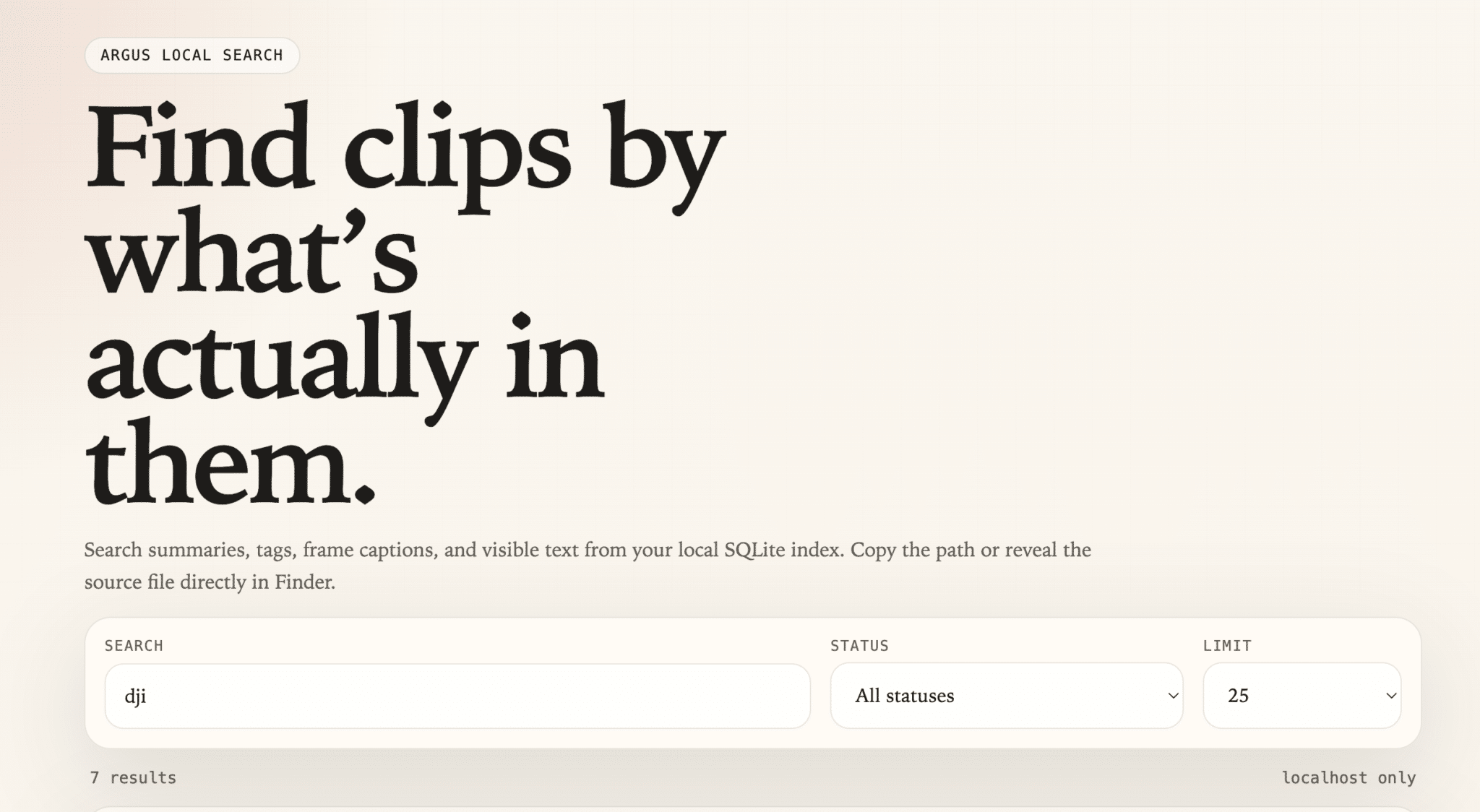
Once the run completes, launch the local browser UI:
argus serve --output-dir ~/ArgusOutput --open-browser
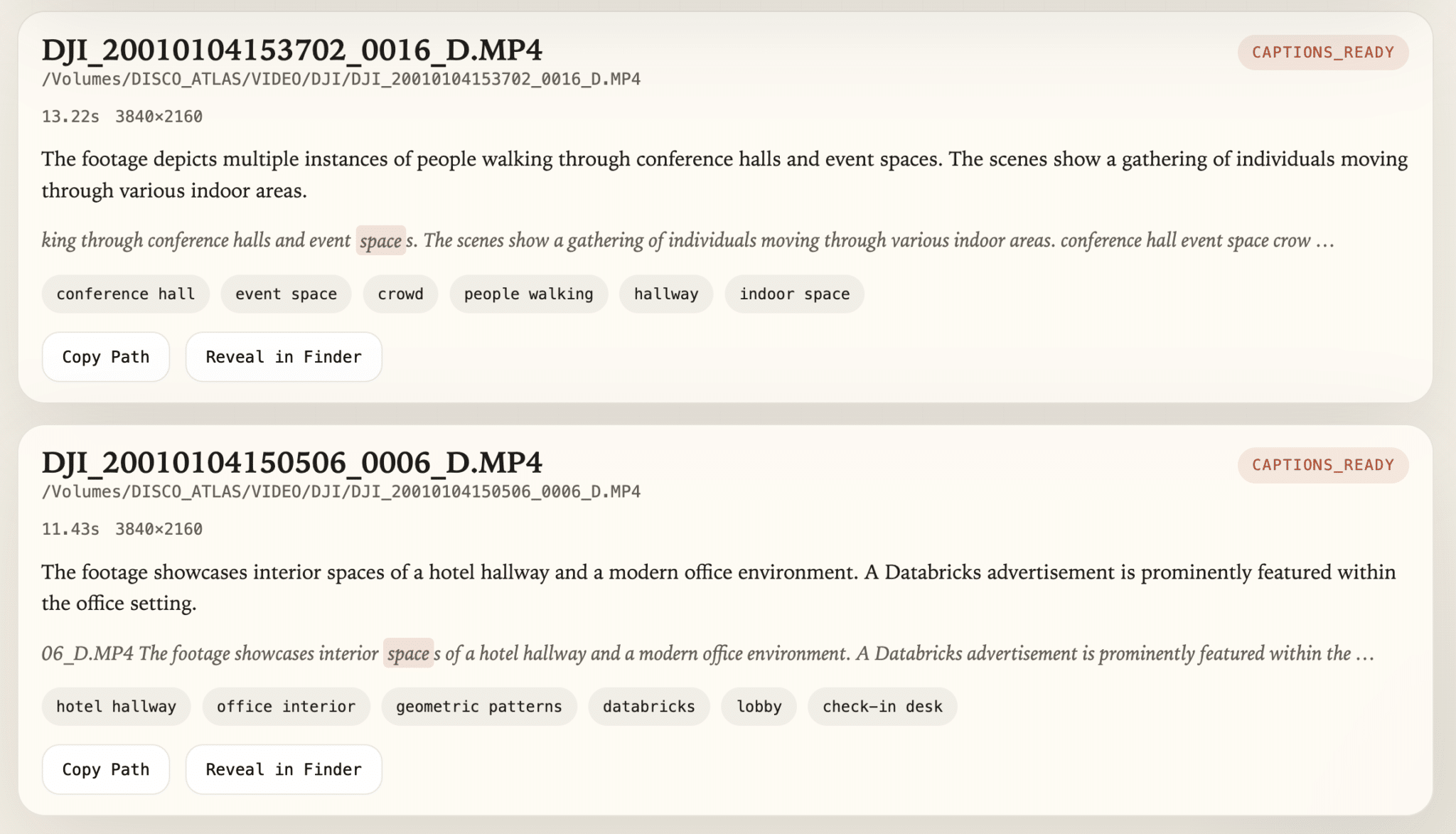
That gives you a simple local search interface where you can:
- search by clip content
- search by tags
- search by visible on-screen text
- copy the source path
- reveal the source file in Finder
Early Version, but It Works!
The main value is not that Argus magically understands everything in a clip. The value is that it removes the blank space between “I know we shot this somewhere” and “here is the actual file path.”
That changes the workflow a lot when you have a large archive.
Instead of searching by memory, you can search by likely content. Instead of opening random folders, you can search for visual descriptions. Instead of relying on naming conventions that fell apart six projects ago, you can search the actual clips.
That is a much better starting point for building a real internal footage library.
What I’m Aiming For as Next Features
There is still plenty to do. For now the focus was on MP4/MOV/MKV files and I’m going to expand things further as I go.
The current roadmap includes:
- improving clip summaries and tag quality
- making the browser workflow more useful for review
- refining search and filtering
- exploring native Blackmagic RAW support through a dedicated adapter (guess which camera family I run?)
For now, the important thing is that the first real workflow already works. I can point Argus at a folder of footage, let it grind away locally, and come back to a searchable library without sending any of that media to a cloud service.
That is exactly the kind of tool I wanted to exist, so I built it.
Project Links
- Github repo: https://github.com/discoposse/argus
- Usage guide: https://github.com/discoposse/argus/blob/main/docs/USAGE.md
If you give it a try and have ideas for where it should go next, open an issue or a PR. This is one of those projects that gets better the more real-world footage libraries it gets tested against.
Happy tagging!